The challenge
Personal finance tools often present large amounts of data without clear next steps for the user.
Case study
A personal finance application built with React and TypeScript for expense tracking and budgeting, developed alongside AI agent tools.
The challenge
Personal finance tools often present large amounts of data without clear next steps for the user.
What I delivered
A React dashboard that organizes spending data and presents it in a way that supports budgeting decisions.
Expensely is a personal finance application that helps users track expenses, manage budgets, and review spending patterns. It is built with React and TypeScript and deployed on Vercel.
I built Expensely alongside AI agent tools so I could learn how to code with AI. The project was a place to practice new build tools, the Git CLI, and error testing. For more complex functions, I used the agent as a tutor: I asked it to explain the approach, then implemented the solution and checked the result in the app.
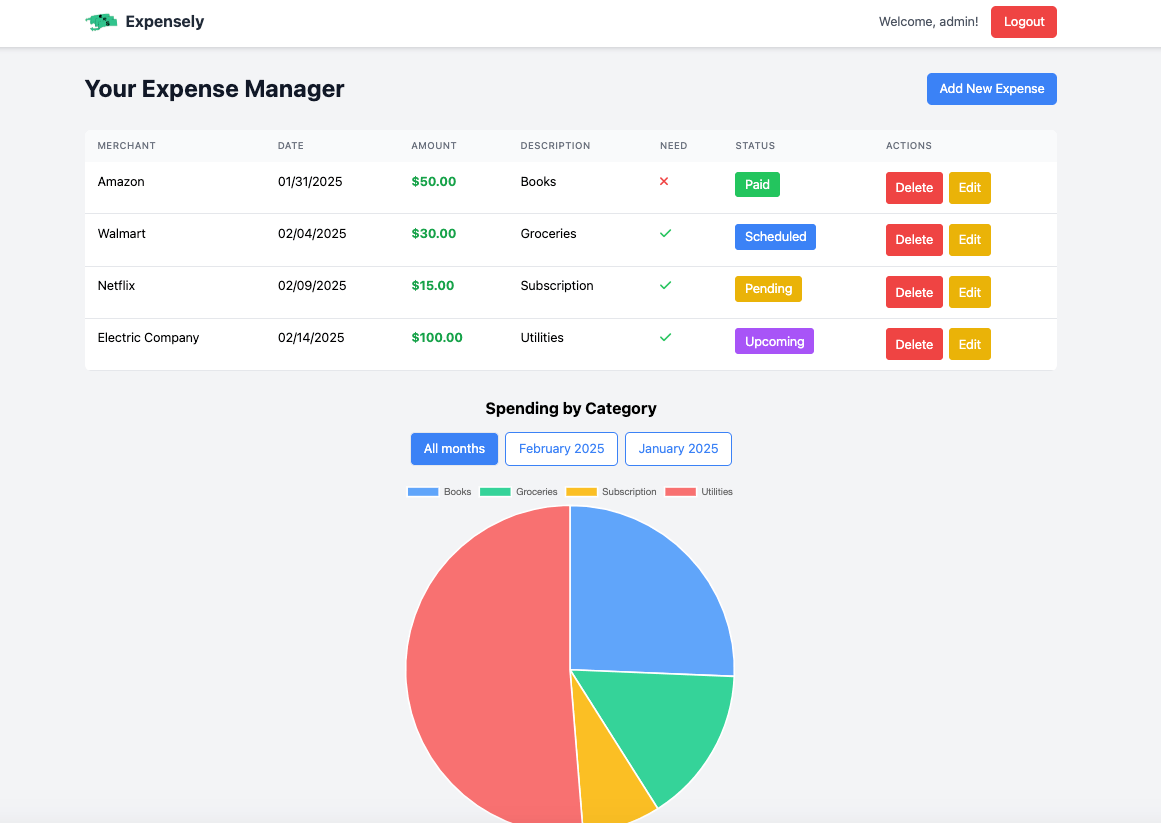
Explore the live application to see the personal finance management experience in action:
View Live DemoSimple and quick expense entry with categorization
Visual budget tracking with alerts and notifications
Clear analytics and spending pattern visualization
Responsive design for desktop and mobile use
Expensely was a learning project as much as a product. I worked with AI agent tools through the whole build, using them to understand unfamiliar tooling and to talk through harder parts of the code.
The application was built using modern web technologies and best practices:
Primary Blue
#2563eb
Secondary Blue
#3b82f6
Success Green
#16a34a
Warning Yellow
#eab308
Error Red
#ef4444
Purple
#a855f7